Wild Blue Skies Buy, Demo and Steam Deck
Still-playable Steam demo, Verified Deck play, and where to purchase
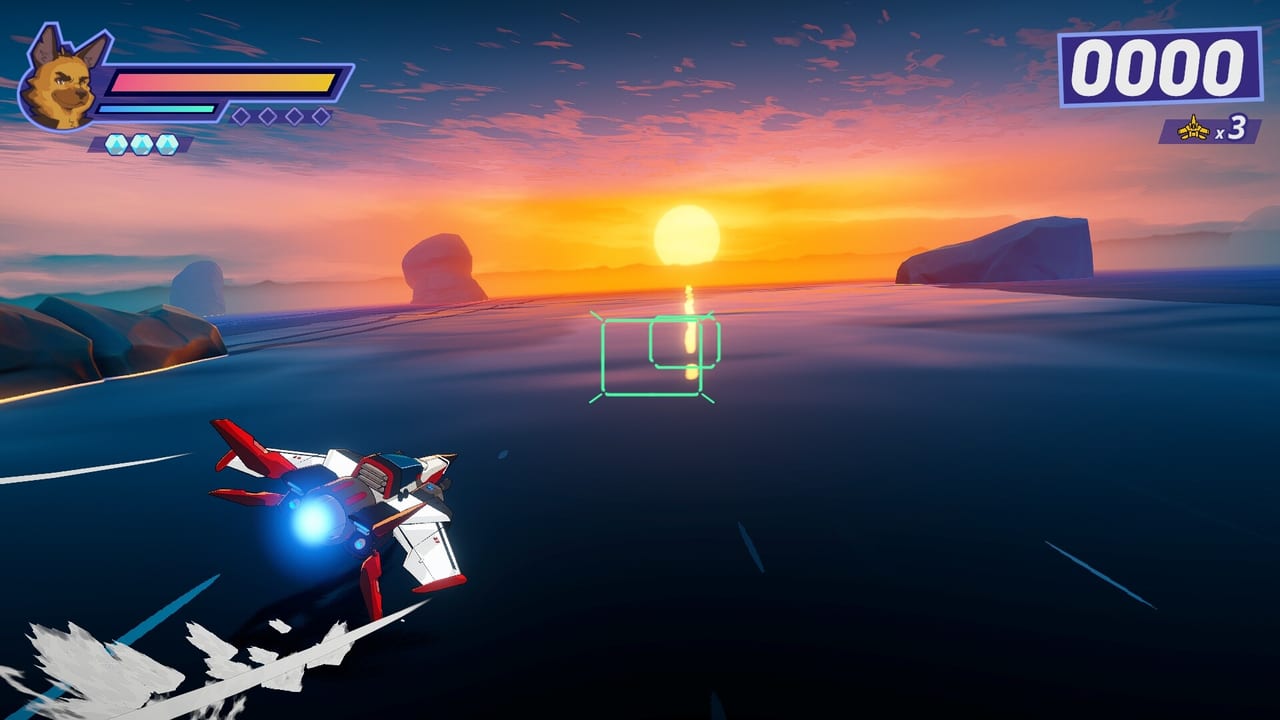
You do not need to buy immediately to fly with Bowie Stray. Balor Games and the development team offer a Steam demo for Wild Blue Skies under app ID 1921490, letting you sample early campaign missions, Cloudcutter handling, and branching cues before spending $14.99 USD on the full release. The Steam demo remains live after launch. Demo progress does not carry over into the $14.99 campaign. Steam Deck is Verified. Switch still waits until fall 2026.
This guide covers demo install, what the Hurricane sample actually teaches, and where to buy the full game.
Steam demo basics
Store: Steam
App ID: 1921490 (shared ecosystem with the full game listing)
What it offers: Early on-rails missions featuring the Blue Bombers, formation flying, targeting tutorials, and preview-confirmed branch or rival encounters suitable for learning—not the entire campaign biomes catalog.
Controller: Full controller support on Steam; pad recommended for arcade feel. Cross-check inputs on Controls Cheatsheet.
Install steps (Steam)
- Open the Wild Blue Skies Steam store page (app 1921490).
- Scroll to the demo section or separate demo listing if split.
- Click Download Demo / Install.
- Verify controller recognition in Steam settings before launching.
- Run the first mission twice—once for story, once for route memory.
If download fails regionally, confirm store availability in your country; publisher materials describe global Steam launch intent.
What to learn in the demo
Treat demo sessions as structured practice:
| Session goal | Wiki follow-up |
|---|---|
| Learn rails and camera | Campaign Overview |
| Test wingman cues | Wingmen |
| Try optional branches | Hidden Missions |
| Practice chains | Score System |
| Benchmark PC | System Requirements |
Avoid judging full-game breadth from demo length alone—Environments like extended desert and cave rotations arrive in the paid release.
Wishlist strategy
Wishlisting costs nothing and improves launch visibility for indie publishers.
Steam: Wishlist the main app 1921490; enable email notifications for release and discounts.
PlayStation 5: Wishlist via the PlayStation store web or console UI when the product page goes live in your region.
Xbox Series X|S: Use Microsoft store wishlist/follow tools similarly.
Nintendo Switch: Follow the title for fall 2026 updates—later than the August console/PC wave per Release Platforms.
Wishlist does not charge automatically; you still choose to buy at launch or wait for reviews via Preview Overview.
Pre-launch checklist
Use this checklist the week before August 13, 2026:
- Demo installed and controller tested
- PC specs verified with Specs Checker if on Steam
- Store notifications enabled on your chosen platform
- Read Who Should Play for audience fit
- Skim Medal Guide if planning completionist runs day one
Demo limitations
The demo does not include:
- Full biome rotation across all campaign environments
- Complete medal and ribbon catalog
- Nintendo Switch build
- Guaranteed parity with day-one patch balance
Expect tutorial undertones and spoiler-light story beats focused on Grimclaw setup.
After wishlisting
Join community discussions carefully—avoid unverified leak claims about hidden missions. This wiki updates from demo-verified facts and official store data.
When launch arrives, transition from demo practice to full Campaign Hub routing and Scoring Hub mastery plans.
Notification setup by store
Steam: Library → Wild Blue Skies → bell icon for update and release emails. Add the demo separately if split listing so both stay visible.
PlayStation: Follow the game on PS App to push release alerts to phone; useful when August 13 falls on a workday.
Xbox: Favorite the store page on console or Xbox app; enable purchase notifications if children share the console to avoid surprise downloads.
Switch: Follow publisher Balor Games where possible; fall 2026 window is wider—set a calendar reminder for Q4 if no exact date posts.
What wishlisting does not do
Wishlisting does not charge your card, reserve limited stock, or guarantee demo progress transfers beyond what the developer enables. It does improve visibility for indie teams and ensures you see patch notes if launch week hotfixes adjust wingman AI or medal thresholds.
Compare demo progress to full game goals
After demo sessions, decide your launch plan:
| Demo skill level | Launch plan |
|---|---|
| Comfortable with rails | Day-one or week-one purchase |
| Mixed on dogfights | Buy after more Ace Tips practice |
| Struggles with controls | More Controls Cheatsheet time before buy |
| Only cares about story | Buy once; skip medal tools |
Family and budget tips
At ~$14.99, Wild Blue Skies fits gift-card budgets for younger players interested in aviation anime aesthetics. Verify age ratings at launch. Share one purchase per platform account—there is no co-op to justify duplicate copies on the same household console.
Demo now, wishlist early, and launch day becomes execution instead of guesswork.
Frequently Asked Questions
Quick answers from launch-day stores, reviews, and in-game systems.
Is there a Wild Blue Skies demo?
Yes. A Steam demo is available under app ID 1921490.
Does the demo include the full campaign?
No. It samples early missions for learning controls, formation flying, and branching basics.
Is the Steam demo still useful after launch?
Yes. The demo stays live for control practice. Progress does not carry over. Steam Deck is Verified; buy the full game on Steam, PS5, or Xbox Series for $14.99.