Wild Blue Skies System Requirements
Minimum and recommended PC specs for Steam
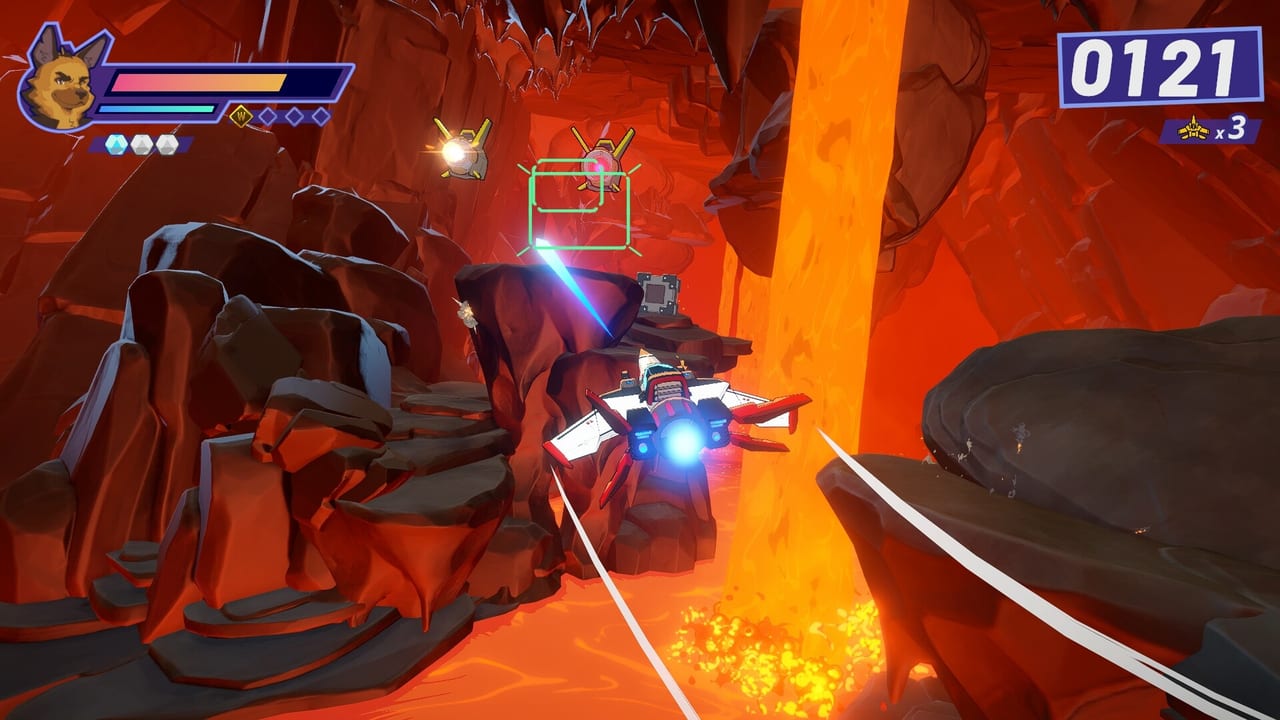
Wild Blue Skies on Steam targets mid-range PC hardware from the late 2010s era, reflecting its focused scope as an on-rails arcade flight shooter rather than a open-world simulation. Chuhai Labs and VITEI BACKROOM prioritize readable action over photorealism, but rival dogfights and dense cave environments still benefit from stable frame rates—especially if you chase Medal Guide gold on timing-sensitive chains.
This page lists official minimum and recommended specifications, explains what each component affects, and points to the interactive Specs Checker for quick comparisons.
Official specifications
| Component | Minimum | Recommended |
|---|---|---|
| OS | Windows 10 64-bit | Windows 10 64-bit |
| CPU | Intel Core i7-7700K equivalent | Intel Core i7-7700K equivalent |
| Memory | 6 GB RAM | 8 GB RAM |
| Graphics | GTX 1080 equivalent | GTX 1080 equivalent |
| Storage | 2 GB available space | 2 GB available space |
Steam lists the same GPU tier for minimum and recommended, implying the primary upgrade path is system memory and overall headroom rather than a higher GPU class.
What each requirement means in practice
Operating system: Windows 10 64-bit is mandatory. Windows 11 generally runs compatible 64-bit titles but verify anti-cheat or middleware notes after launch if issues appear.
CPU (i7-7700K equivalent): On-rails shooters stress single-thread pacing for camera rails and spawn timing. Older quad-core CPUs may work if they meet equivalent passmark scores, but stutter during multi-target waves hurts Score System chains.
RAM (6 GB min / 8 GB rec): 6 GB meets minimum but leaves little margin for background apps. Close browsers and overlays during medal attempts; 8 GB recommended aligns with smoother memory spikes during biome transitions.
GPU (GTX 1080 equivalent): Handles 1080p arcade visuals with headroom. Integrated graphics are unlikely to meet minimum; laptop users should confirm discrete GPU activation.
Storage (2 GB): Small install footprint—likely asset compression without massive open worlds. SSD still helps load times between mission replays.
Performance goals for score runners
Medal hunting is sensitive to frame pacing, not just average FPS:
- Target stable 60 FPS at your chosen resolution before chasing no-damage medals.
- Reduce motion-heavy post effects if the PC version exposes graphics toggles at launch.
- Prefer wired controllers for input consistency per Controls Cheatsheet.
If hardware sits below minimum, consider PS5 or Xbox Series versions on Release Platforms instead of fighting sub-30 FPS dogfights.
Console and Switch notes
This page covers PC specs only. PlayStation 5 and Xbox Series X|S launch August 13, 2026 without user-adjustable hardware concerns. Nintendo Switch (fall 2026) will have separate performance expectations—watch post-launch impressions before assuming parity with PC or current-gen consoles.
Demo as a benchmark tool
Install the Steam demo (app ID 1921490) via Demo and Wishlist and run repeated missions while monitoring FPS overlays. Demo performance usually correlates with full release on similar settings, though final optimization may shift results slightly.
Upgrade guidance (if you are below spec)
| Bottleneck symptom | Likely fix |
|---|---|
| Stutter on dense waves | More RAM (8 GB+) or close background apps |
| Low FPS at 1080p | GPU upgrade beyond GTX 1080 class |
| Long load times | Move install to SSD |
| Input lag | Wired controller, disable heavy overlays |
Laptop-specific guidance
Gaming laptops often ship with hybrid graphics. Steps before first launch:
- Update NVIDIA or AMD drivers from the vendor site, not only Windows Update.
- Plug into power—battery modes throttle CPU/GPU.
- Assign Wild Blue Skies to the discrete GPU in Windows Settings → System → Display → Graphics.
- Disable manufacturer “quiet mode” during medal attempts.
Thermal throttling after 30+ minutes can mimic skill plateaus; pause between replay marathons.
Ultrawide and high-refresh notes
Wild Blue Skies is an on-rails shooter, not a competitive esports title, but high refresh monitors still improve input smoothness for Score System chains. Ultrawide support at launch is unconfirmed; expect pillarboxing or fixed aspect if unsupported—check options menu after launch.
Streaming and capture overhead
Streaming adds CPU/GPU load. If OBS drops frames during rival dogfights, use NVENC/AMD encoders or lower stream resolution before blaming game optimization. Medal practice streams should use offline recordings instead of live capture when possible.
Future patch headroom
Two gigabytes storage suggests a compact install today, but patches may grow file size. Keep 5–10 GB free on the install drive for hotfixes around launch week.
Wild Blue Skies is modest on paper but unforgiving to timing when hardware dips. Confirm specs early, use the Specs Checker, and treat the demo as your personal benchmark before August 13, 2026 launch.
Frequently Asked Questions
Quick answers from launch-day stores, reviews, and in-game systems.
Can Wild Blue Skies run on a GTX 1080?
Yes. GTX 1080 equivalent is the listed minimum and recommended GPU tier on Steam.
How much RAM do I need?
Minimum 6 GB RAM; 8 GB recommended for smoother performance.
How much storage space is required?
About 2 GB of available storage for the PC version.